Saturday, August 2, 2014

A QEMU BUG: No Context Switch on a Stale Snapshot

Background

Depending on the age of a snapshot taken with Qemu, its behavior could vastly vary from running perfectly normally to exhibiting behavior that appears the OS is frozen. This is a result of a bug in the Qemu system. My conjecture is that the bug is related to the way in which Qemu handles the timers for the guest OS.

Purpose

To prove that there is a bug in Qemu that prevents older snapshots from running properly, we inserted a function into the Qemu system, helper_trace2, that executes before every single instruction is run through the Qemu emulated CPU. By inserting this function into ops_sse.h, it allows us to verify that the Qemu system is in fact not performing a context switch. We will be able to see that a context switch occurred because the function prints out, "new xth CR3 value".  This message will only be generated for new processes. CR3 (Control Register #3) is a special register in Intel's CPUs. This register is used for keeping track of the beginning address of a page table for the current process. It can also act as a unique identifier for a process. 

Procedure

1. First, I will demonstrate the output of helper_trace2 by debugging into Qemu using GDB

Once Qemu begins to run, the message is printed out immediately


The part of helper_trace2 that prints out that message looks like this:


2. Now, I will let Qemu load the guest Windows XP system normally to demonstrate that the message is printed out with each new process generated by the guest OS


For each new process, helper_trace2 prints out the page table address for that particular process. Now if we were to run an older snapshot, the "xth CR3" value would never be printed indicating that a context switch is not being performed. 

3. I'm going to demonstrate that when an old snapshot is loaded into Qemu, only one statement from helper_trace2 will be printed.

First, I load the old snapshot and then send key press events to the guest OS.


As shown in the above picture, a second CR3 value was obtained, but not matter how long I wait or event I send, a new process is never switched to. This can also be observed by viewing the Qemu window displaying the guest OS. They "d" key is not present in the command window nor is the cursor blinking.


Conclusion

Since no new CR3 values are found, we can conclude that no new processes are being created and therefore, the Qemu CPU is not performing a context switch. This is a bug in the Qemu system that we will fix in the future.


Sunday, July 27, 2014

Debug the Loading Delay Problem of Qemu

Background:

In the last post, we analyzed the Windows's kernel assembly instructions corresponding to timer interrupts and CPU context switches. Since we have a better understanding of what occurs at the kernel level, it is time to observe the loading delay problem encountered in Qemu when loading older snapshots of Windows XP. When a snapshot is loaded in Qemu, it may work as it is meant to, not load at all, or become unstable and slow due to a problem with the way in which Qemu handles timer interrupts. 

Purpose:

Demonstrate the aforementioned problem and show the reason for Qemu's unstable behavior.

Steps:

1. Start by booting up the Linux vm that has Qemu installed and start Qemu using "sudo gdb qemu-system-i386"


2. Let's grab the run parameters for Qemu that are stored in run.sh


Then copy all the parameters from the "-m"


3. Exit vim, and the shell and paste the parameters after the run command in gdb


4. If the process crashes, we have to then type "handle SIGUSR1 noprint" and re-run Qemu


Then,


5. Now you can see that Qemu has started


6. Snapshots for the Windows XP image were taken previously and now we are going to analyze what happens when these snapshots are loaded and take note of how the system behaves. First, let's list the snapshots available and load one of them.


When I tried to load the snapshot named "snap111", Qemu crashed because the snapshot is too old.


7. Now re-run Qemu and I am going to try snap222


This time, the snapshot loads properly and it is displayed in the Qemu window


8. Now we are going to see if the snapshot is behaving as it should by sending it key commands through Qemu.

The first command I am going to send is the "sendkey d" command and it should print "d" in the command prompt.

Qemu command

Snapshot

Unfortunately, the command was not properly received by the snapshot because the timer that controls the context switch of the CPU is not working correctly. Let us try this experiment on a snapshot that was taken more recently.

9. Quit that Qemu session and re-run Qemu again.

10. Creating a new snapshot should minimize the impact of the bug in Qemu's APIC timer and allow the sendkey command to work for a period of time.


As you can see, a new snapshot has been created.

11. Let's load the snapshot and try the sendkey command again.


12. Even with a new snapshot, the command is not properly sent to the vm, because the behavior of the bug in the APIC timer and the context switch is sort of random.

Conclusion:

As you can see, there is a problem in the way Qemu handles snapshots. The behavior is unpredictable and makes the snapshot unusable. In addition to the sendkey command not working properly, it is worth taking note that the command prompt on the Windows vm does not display the blinking cursor as you would expect. This is also a result of the bug in the way Qemu handles the APIC timer.


Sunday, July 13, 2014

Using WinDBG to Explore Round Robin Thread Context Switch for Win32 Kernel

Background:

We explored the ReactOS code for HalpClockInterrupt to get an idea of what may be involved when the kernel handles process scheduling and timer interrupts.  Now that we know the general framework of the scheduling algorithm, we are going to debug into the actual Windows XP kernel using WinDBG to view the assembly code for it and draw parallels between the assembly and the ReactOS code.

Purpose:

The purpose of this article is to more closely analyze the round robing context switch algorithm of the Win32 kernel code and determine what the initial quantum value given for a thread is. The value of a thread's quantum indicates how long the thread will run before a context switch occurs and a new thread gets scheduled.

Steps:

1. Boot up WinDBG in kernel debug mode and the Windows XP image to debug

2. Get the address of HalpClockInterrupt (!idt -a)


3. Set a hardware breakpoint at the address (ba e1 806d4d50) then continue execution until the breakpoint is hit (NOTE: your address may differ)


Command breakdown: 
b - set a breakpoint
a - hardware break point
e1 - when one byte of the address is executed

4. Now we will step through the assembly of HalpClockInterrupt as well as some of the other functions called from it while comparing the assembly to the ReactOS code


The code in the above picture creates a new stack frame for HalpClockInterrupt

5. 


Corresponds to the following code from ReactOS


6.  There is plenty of assembly code that does not seem to correspond to any code listed in ReactOS's implementation of HalpClockInterrupt. For now, we will bypass this assembly.

7. Now we can see that KeUpdateSystemTime is called from HalpClockInterrupt with its corresponding parameters.
HalpClockInterrupt

Corresponding assembly

8. The following ReactOS code checks to see if the timer has expired by comparing it to the one stored in KiTimerTableListHead which is a struct

HalpClockInterrupt

KiCheckForTimerExpiration

Corresponding assembly

9. Now the kernel code is checking to see if the debugger is enabled

KeUpdateSystemTime

In this case, the assembly does not go into the body of the if statement.

corresponding assembly

10. The next chunk of assembly skips into the end of an if body in KeUpdateSystemTime, but the main part to look at is the call to KeUpdateRunTime. This is where the quantum value of a thread is read and a context switch occurs.

KeUpdateSystemTime

Corresponding assembly code (partially)

11. Let us explore KeUpdateRunTime.

Corresponding assembly when KeUPdateRunTime is called

12. After stepping through various lines of assembly, we will come across a section that appears to resemble a piece of the KeUpdateRunTime code that is trying to determine if the thread is in an ISR. An ISR is an interrupt service routine, which is responsible for doing whatever is necessary to stop an interrupt.

KeUpdateRunTime
Assembly code

13. Following that, ReactOS code checks to see if the DPC queue is large enough. DPC (deferred procedure call) is an OS mechanism that permits high priority tasks to run ahead of low priority, but required tasks. Each deferred task is appended to a queue to be run later. In the case of the ReactOS code, it checks to see if the queue has become too large and if so, executed one of the deferred tasks.

KeUpdateRunTime

Associated assembly

14. After several more step throughs, we come across an assembly line that subtracts 3 from an offset of EBX.  I believe this memory address to be the quantum of the thread based off the code in ReactOS. When the quantum reaches 0, it will perform a context switch and a new thread will be executed.

assembly


KeUpdateRunTIme

15. If you click CLOCK_QUANTUM_DECREMENT, you will come across a file called types.c that has the following definition.


CLOCK_QUANTUM_DECREMENT is defined to have a value of 3 which corresponds to the value subtracted from that particular memory address in the previous step. The max quantum of a thread is set to 0x7F which is 127. Since, a thread has a max quantum of 127 and has 3 subtracted from it for every other tick, (127/3)*2 = 84 which is how many ticks a thread runs for.

16. Now lets find the frequency of the clock. It has the possibility of being one of two clocks, APIC or PIC. If you do a quick Google search, you may come across this page. The description of APIC Periodic Mode,  is very similar to the code we have seen in ReactOS and the corresponding assembly where the timer keeps a count and decrements it until it reaches 0. When it reaches 0, it performs a context switch and reinitializes the count.

17. HalpInitializeClock is a ReactOS function in timer.c. From this file we can see that timer frequency is 1 MHz with an interval of 10 milliseconds.

timer.c

Conclusion:

We discovered what the max quantum of a thread is (127) and each thread is allocated 84 ticks. The frequency of the APIC timer is 1 MHz so the total run time for a thread is 84/10000 = 0.0084 seconds = 8.4 milliseconds per thread.

Total Time: 10 hours

Saturday, May 24, 2014

Exploration of Windows CPU Scheduling Algorithm by Kernel Debugging using WinDBG


Background:

When an OS snapshot is loaded into the Qemu emulator for analysis, it takes an increasing amount of time for the snapshot to load based on how long ago it is taken. In order to fix this problem within Qemu, it is vital to understand how the Windows XP kernel handles process scheduling and timer interrupts.

Purpose:

To understand the Windows kernel code for process scheduling and handling timer interrupts.

Steps:


1. Start WinDBG on your machine and start kernel debug (File --> Kernel Debug --> OK)

Make sure your COM settings match those in the picture

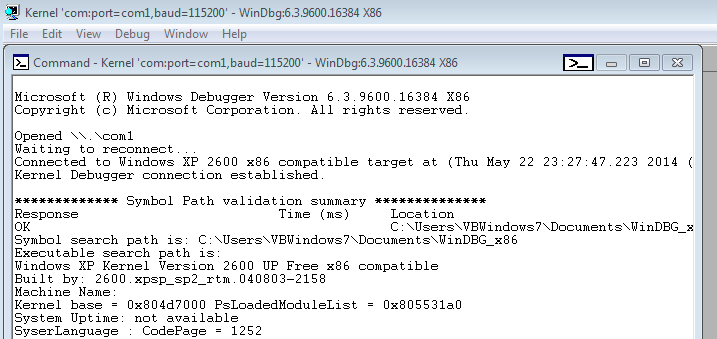
2. Start your Windows XP virtual machine and WinDBG should display something similar to the following picture

******************
NOTE: If you see something similar to the below picture, follow these steps from Microsoft:


Using the Microsoft Symbol Server with WinDbg

To use the Symbol Server Web site from within WinDbg, follow these steps:
  1. Start the Windows Debugger (WinDbg.exe).
  2. On the File menu, click Symbol File Path.
  3. In the Symbol path box, type the following command:
    SRV*your local folder for symbols*http://msdl.microsoft.com/download/symbols
    where your local folder for symbols is the folder in which you copy your local symbol cache. The debug symbols are downloaded to this location.

    Note You can point to any local path or share that your computer can reach; it does not have to be a location on the computer's hard disk.
Alternatively, you can also use the .sympath command at a command prompt to set the symbol path.
After the symbols are downloaded, each time after you use WinDBG you will need to click on File --> Symbol File Path then paste (or browse) the path where the symbols were downloaded to and press OK before you start to debug your Windows virtual machine

******************


3. Lets send an interrupt to the target machine (Windows XP virtual machine) so that we will be able to analyze some of the current system conditions (Debug --> Break)


And WinDBG should display something similar to the following:

The box circled in yellow is where we can input WinDBG commands

4. Type the WinDBG command "!idt -a" which will display all the interrupts


5. Once all the interrupts are displayed, lets search for one that may handle any timer interrupts

HalpClockInterrupt handles timer interrupts and process scheduling

6. Now that we have seen what interrupts are currently active on the system and found the one related to timer interrupts, let us review the C code for it.

We are going to use ReactOS to look at the code for HalpClockInterrupt. This is an open source site that has code derived from the Windows NT architecture.


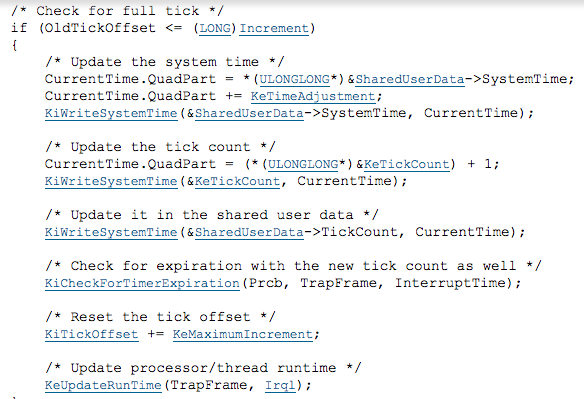
As you can see, the code for HalpClockInterrupt clears the interrupt, and updates the kernel's system time. Lets take a closer look at each line of the function:

NOTE: if you go to the site yourself, you will be able to click on the links to see where certain functions/macros are defined and given values

Line 1 (33): ASSERT(KeGetCurrentIrql() == CLOCK2_LEVEL);


  • CLOCK2_LEVEL:
    • Defined: armddk.h
    • Type: Macro
    • Value: 28
    •  Meaning: Not known at this time
  • KeGetCurrentIrql():
    • Defined: keytypes.h
    • Type: Macro (function)
    • Value: PCR->Irql
    • Functionality:
      • Gets the current Irql (Interrupt ReQuest Level) for the kernel
      • PCR (process control region) is a macro that contains an address (KIPOPCRADDRESS = 0xffdff000)
      • Irql is of type PKIRQL which is a pointer to an unsigned char which helps specify a kernel type
      • PCR->Irql gets the interrupt request level of the current process
  • ASSERT():
    • Defined: mode.c
    • Type: Macro (function)
    • Parameter: an unsigned char type defined as a GLboolean
    • Functionality:
      • Gets the value of the result from the passed in conditional statement
  •  Line Summary:
    • Used to help clear the interrupt and gives ASSERT a value based on the above conditional statement

Line 2 (34): WRITE_REGISTER_ULONG(TIMER0_INT_CLEAR, 1);

  • TIMER0_INT_CLEAR:
    • Defined: sp804.h
    • Type: Macro
    • Value: TIMER_BASE(0) + 0x0C
    • Meaning:
      • Sets (clears) the clock value by passing a 0 to TIMER_BASE and then adds 0x0C (12) to the result of TIMER_BASE which is an address (0x101E2000)
  • WRITE_REGISTER_ULONG(r, v):
    • Defined: bootvid.c
    • Type: Macro (function)
    • Parameters: GLboolean r, GLboolean v
    • Functionality:
      • Sets the value of r equal to value of v (1)
  • Line Summary:
    • Used to help clear the interrupt and set the value of a register
·    

Line 3 (41): KeUpdateSystemTime(KeGetCurrentThread()->TrapFrame, HalpCurrentTimeIncrement,CLOCK2_LEVEL);

  • KeGetCurrentThread()->TrapFrame:
    • Defined: hal.h
    • Type: Macro
    • Value: _KeGetCurrentThread (macro function that grabs the current thread)
    • Meaning:
      • Obtains the thread currently being executed and its associated trap frame
  • HalpCurrentTimeIncrement:
    • Defined: timer.c
    • Type: ULONG (variable)
    • Value:  Not known at this time
    • Meaning: Not known at this time
  • CLOCK2_LEVEL:
    • Defined: armddk.h
    • Type: Macro
    • Value: 28
    • Meaning: Not known at this time
  • KeUpdateSystemTime():
    • Defined: time.c
    • Type: Function
    • Parameters: trap frame (PKTRAP_FRAME), Increment (ULONG), OldIrql (KIRQL)
    • Functionality:
      • Updates the system time
      • Checks to see if the current tick is being skipped and if so marks it so that it gets handled next time
      • Updates the interrupt timer and global time keeping data
      • Checks to see if the timer expired
      • Updates all tick data if the current tick is a full tick and less than or equal o the old tick
  • KeUpdateRunTime(IN PKTRAP_FRAME TrapFrame, IN KIRQL Irql)
    • Called within KeUpdateSystemTime()
    • Defined: time.c
    • Type: Function
    • Parameters: PKTRAP_FRAME, KIRQL
    • Functionality:
      • Obtains the current running thread and PRCB (process region control block) 
        • The PRCB is a struct that contains information about the processor
      • Checks if the processor is skipping this current tick
        •  If the tick is being skipped, the function will return
      • Increases the interrupt count
      • Checks to see if the process is in user mode or kernel mode
        • If the process came from user mode, it increases the process’s user time which increments how much time the current process has spent in user mode
        • If the process did not come from user mode (it came from kernel mode)
          • Increments the amount of time it spent in kernel mode
          • Increments the process’s interrupt time, kernel time, or DPC time (the amount of time the process has been on the Deferred Procedure Call queue) based on the value of DISPATCH_LEVEL (which is a macro defined in ksx.template.h) when being compared to the passed in value for IRQL
            • DPC is part of the Windows OS that allows high priority tasks to defer lower priority, but still required, tasks for later execution
      • Updates the DPC rates
      • Checks to see if the DPC queue is large enough
        • Adjusts the maximum depth of the DPC queue
      • Decrements the thread quantum (Thread->Quantum)
        • Thread Quantum is a global variable that keeps track of how long the current process has left before the CPU jumps to the next process
        • When the thread quantum reaches 0, the CPU has to perform a context switch to another process
      • Checks to see if a context switch needs to occur
        • If a context switch occurs:
          • Sets the value of Prcb->QuantumEnd to 1 (true)
          • Calls the function HalRequestSoftwareInterrupt and passes the DISPATCH_LEVEL to it
  • HalRequestSoftwareInterrupt(KIRQL Irql)
    • Called within KeUpdateRunTime()
    • Defined: pic.c
    • Type: Function
    • Parameters: KIRQL (the interrupt request level)
    • Functionality:
      • forces a software interrupt by overwriting the value of a register
  • Line Summary:
    • Obtains the current process and updates the internal structures in order to trigger a context switch

Summary:

The HalpClockInterrupt function updates the systems kernel level clock and clears previous interrupts and registers. It also alerts the CPU to when a context switch needs to occur based on the value of the process's thread quantum. Once the quantum is given a value of 0, a context switch occurs and the CPU will execute a different process. 

Total Hours: 8